|
Hey there, Stepping Stones Crew! 🪨🍎
Welcome to Edition #5 of The Stepping Stone! Summer’s winding down, backpacks are coming out, and it’s officially our favorite season: back to school.
This month: a look inside Career Hub from both sides of the platform, an Innovation Radar story about AI giving teachers six weeks of their year back, a document skill that’ll save you hours a week, seven quick AI tips, and a brand-new round of Two Truths and an AI.
Sharpen those pencils. Let’s dive in.
|
|
Should we host a live AI webinar?
Nothing’s scheduled yet — we’re just counting hands. Takes 10 seconds.
Curious what we’d cover? Full details further down ↓
|
|
|
| |
| 🚀 The Big Stories |
Feature Story
|
|
Career Hub
One platform. Two very different jobs to do.
Career Hub is the home base we built for clinicians and the Clinical Managers who support them. It replaced a mess of email threads, spreadsheets, and "who do I even ask about this?" with one place that answers both questions: what do I need to know today, and who on my caseload needs me right now.
It’s live across the company, 3,406 active clinicians are on it, and it just shipped its biggest quality-of-life release yet.
|
For Clinicians
|
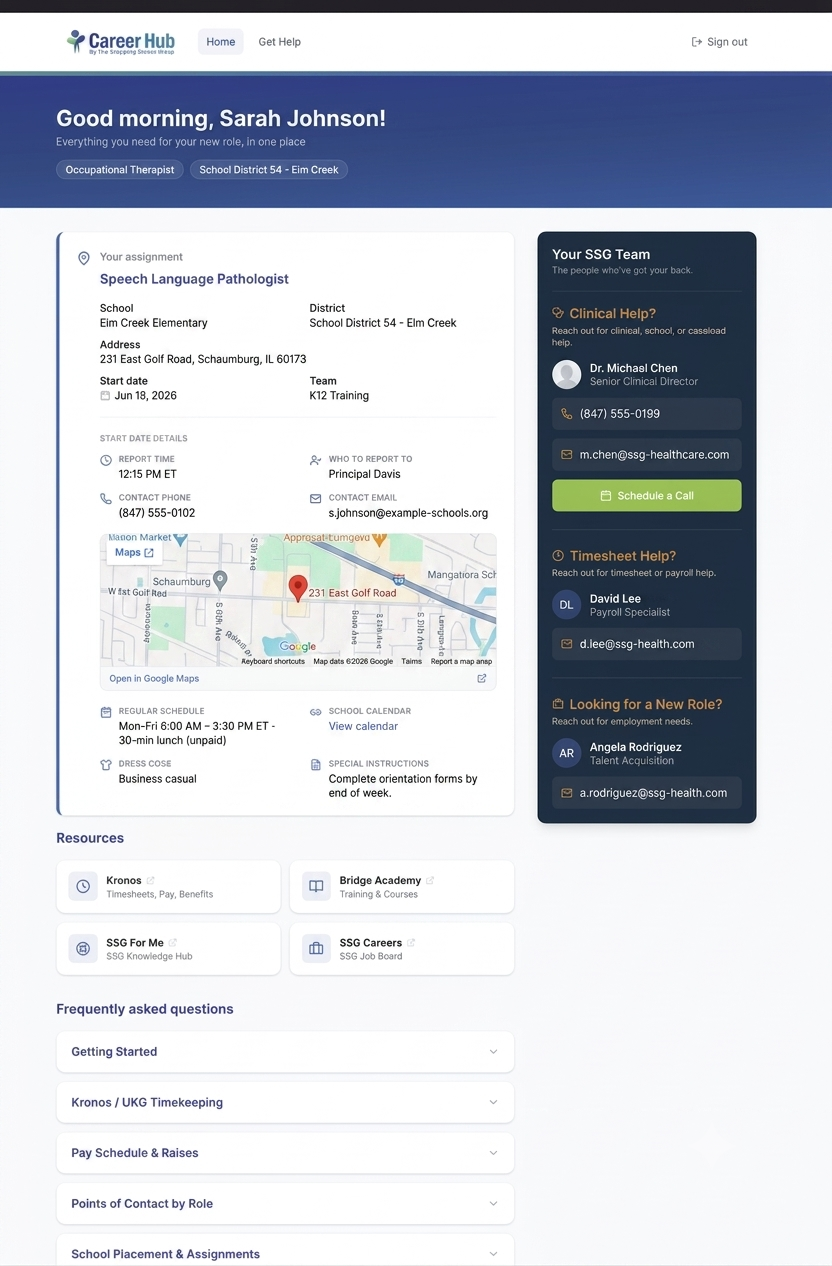
✓ Your placement, start date, school address, and who to report to
✓ Meet your SSG team before day one
✓ Ask for help without hunting for an email address
✓ Benefits, pay schedule, and first-day FAQs in one spot
|
|
|
|
For Clinical Managers
|
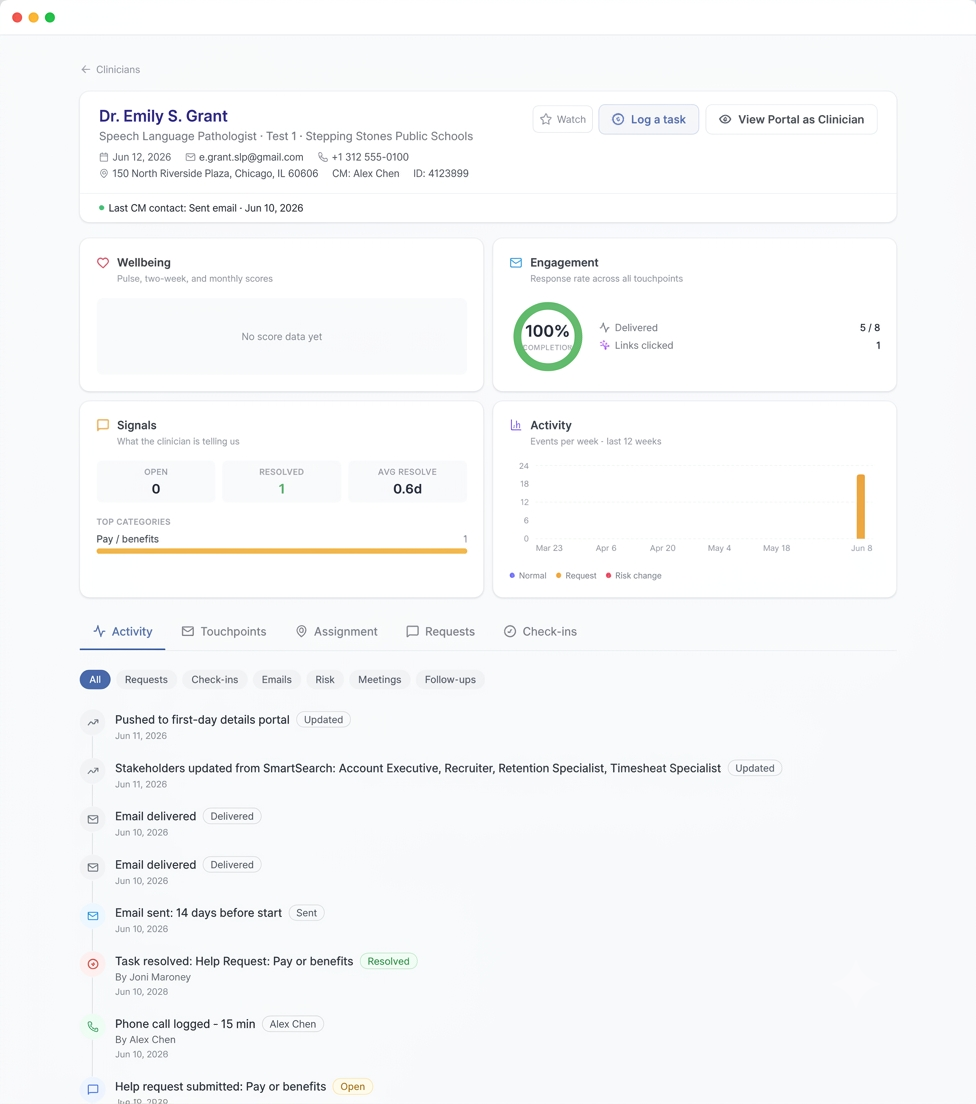
✓ Your full caseload at a glance — school, start date, risk level
✓ Triage and resolve clinician requests in real time
✓ Update start day details once — clinicians see it instantly
✓ Spot trouble early with request history and risk indicators
|
|
Same platform, two front doors. One shows a clinician their placement; the other shows a manager their entire caseload. Tap either image to enlarge.
Career Hub by the Numbers
|
9.4/10
Clinician survey sentiment
Target was 8. We beat it.
|
|
4.5hrs
Avg. help request response
Against a 12-hour target.
|
| |
|
3,406
Active clinicians on Career Hub
Plus 61 Clinical Managers.
|
Rolling 30-day window ending July 27, 2026.
What Clinicians Are Saying
What we’re hearing as Career Hub rolls out.
|
“It’s clear that SSG is always looking for improved ways to support us — and that’s what makes me always want to return.”
— Speech-Language Pathologist, Georgia
|
| |
|
“If I send a question at 9pm, I’ll actually have an answer waiting by the time I get to school the next morning. That’s going to be the part that makes me trust it.”
— Occupational Therapist, Illinois
|
| |
|
“Having my first day information was a huge relief. In previous years at SSG, I never got this info, and it was really nice to have before I started. I felt a lot more comfortable this year going to a new assignment.”
— School Psychologist, Maryland
|
|
Why It Matters
A clinician walking into a new school on day one should already know where to park, who to find, and what to wear. A Clinical Manager should be able to see who’s struggling before it becomes a resignation. Career Hub exists to make both of those true — and a 9.4 sentiment score with a 0.1% fall-off rate says it’s working.
|
|
| |
| 📡 The Innovation Radar |
External
|
|
🍎 AI Is Giving Teachers 6 Weeks of Their Year Back
Source: DemandSage Education Research
|
It’s back-to-school season, so here’s a stat that hits close to home: teachers who use AI tools at least weekly are saving an average of 5.9 hours per week — that adds up to roughly six extra weeks of reclaimed time across a school year.
And it’s not just about time. 69% of teachers say AI tools have improved their teaching methods, and 55% say they now have more time to interact directly with students. A Harvard physics study even found students using AI tutors learned more than twice as much, in less time, compared to traditional classrooms.
But here’s our favorite stat: human tutors can read a student’s emotional state with 92% accuracy. The most advanced AI tutoring systems? Only 68%. The tech saves time — but the humans remain irreplaceable.
|
Product Insight
Why Stepping Stones Crew Should Care: This is the same playbook we run at SSG — from Project Forge to Career Hub, our tools exist to hand time back to the people doing the human work. AI handles the paperwork; our clinicians and teams handle the kids. That 92% vs 68% gap? That’s why what our people do can’t be automated.
|
|
| |
| 🧠 AI Skill of the Month |
Try This
|
|
Put Your Documents to Work
Stop reading 40-page PDFs. Start asking them questions.
One of Claude’s most underused superpowers: you can upload files — PDFs, Word docs, Excel sheets, CSVs, even screenshots — and just ask questions in plain English. Claude reads the whole thing (charts and tables included) and gives you answers, summaries, and analysis in seconds. You can even upload multiple files and have Claude compare them.
|
3 Quick Wins to Try This Week
1. The Meeting Skipper
Upload meeting notes or a long email thread → "Give me the 5 key takeaways and any action items with my name on them."
2. The Spreadsheet Whisperer
Upload an Excel or CSV export → "What trends should I know about? Build me a summary table." Zero formulas required.
3. The Contract Decoder
Upload a dense PDF → "Explain this in plain English and flag anything unusual."
|
|
⚠️ Pro tip (the compliance kind): Keep clinician and student PHI/PII out of your uploads. When in doubt about a document, check with IT before uploading. Smart AI use is safe AI use.
|
|
| |
| ⚡ Quick AI Tips |
10 Seconds Each
|
|
How to Get Better Answers
Seven habits that separate a mediocre answer from a great one.
Most people use Claude like a search engine — type a question, take whatever comes back, move on. When the answer lands flat, it’s easy to assume the tool isn’t that good. Usually the tool is fine. The ask was vague.
No course required, no prompt library to memorize. These are the small adjustments that turn Claude from a novelty you tried once into something you actually reach for on a Tuesday afternoon. Steal the ones that fit your work.
|
1. Ask for the format. Tack on “as a table,” “in 3 bullets,” or “as an email I can send as-is” and you’ll stop reformatting answers by hand.
|
| |
|
2. Say who it’s for. “Explain this to a district administrator” and “explain this to a brand-new clinician” produce completely different answers. Both useful. Very different.
|
| |
|
3. Push back instead of starting over. “Too formal, try again” or “cut this in half” beats rewriting your prompt from scratch. It remembers the whole conversation.
|
| |
|
4. Show, don’t describe. Paste one example of something you liked and say “more like this.” One good example beats a paragraph of instructions.
|
| |
|
5. Don’t clean it up first. Dump the messy notes, the half-finished thought, the ugly paste from Excel. Tidying it up before you ask is wasted work — that’s the job you’re handing over.
|
| |
|
6. Ask it what it needs. Stuck on a request? Try “What else do you need from me to do this well?” It’ll tell you, and the second answer is always better.
|
| |
|
7. If you do it twice, make it a Project. Anything you find yourself re-explaining every week — your team’s templates, your tone, your reference docs — belongs in a Project. Set the context once and every future chat starts there. (Missed last month’s deep dive? Projects were July’s AI Skill of the Month.)
|
|
| |
| Want the Live Version? |
One Click
|
|
We’re Thinking About Hosting an AI Webinar
Same tips, but live — and you can actually ask questions.
Reading about AI is one thing. Watching someone do it, live, with a real work problem in front of them is another. We’d like to run a session that pulls together everything we’ve covered in this newsletter — and go a lot deeper than a few paragraphs allow.
|
What We’d Cover
✓ Writing prompts that actually work — the formula, live, on real examples
✓ Claude Projects — set up your context once, stop repeating yourself
✓ Putting documents to work — PDFs, spreadsheets, contracts, meeting notes
✓ What’s safe to share — the PHI and PII rules, in plain English
✓ Live Q&A — bring the task you’ve been dreading and we’ll work it out together
|
Here’s the deal: nothing is scheduled yet. If enough people raise a hand, we’ll make it happen. One click, no calendar invite, no commitment — we just want to know if there’s interest.
Takes about three seconds. We’ll report back next edition.
|
| |
| 🎲 Two Truths and an AI |
Play Along
|
|
|
Three wild AI stories below. Two are 100% real. One we made up.
Can you spot the fake?
|
1
As of July 2026, every new car registered in the European Union must include an AI system that watches the driver’s gaze and head movements to detect distraction — without recording or sending footage anywhere.
|
|
2
A smart eyewear company integrated Claude AI into its entire sunglasses lineup — so you can literally chat with an AI through your shades.
|
|
3
A school district in Ohio installed AI lunchroom cameras trained to detect food fights before they start — the system can reportedly predict a flying tater tot 8 seconds in advance.
|
Got your guess? Keep scrolling — the answer’s at the bottom!
|
| |
| 🍎 Back to School, Back to Business |
The Team
|
|
|
The Product & Innovation Team reported for the first day of school.
Fresh notebooks, sharpened pencils, and a full slate for the year ahead. Here’s to a great school year — for our clinicians, our districts, and the students they serve.
Peter • Andrea • Mason • Eva • Antonio • Devin • Ryan
|
| |
|
🥁
Two Truths and an AI — Revealed!
#3 is the fake! No AI is predicting flying tater tots (yet). But #1 (the EU’s mandatory driver-distraction AI) and #2 (Claude-powered sunglasses from Lucyd) are both 100% real. The future is watching you drive and living on your face.
|
|
.png)
Transforming Lives Together
The Stepping Stones Group • Product & Innovation Team
Built with ☕ and questionable amounts of AI by the Product & Innovation Team
© 2026 The Stepping Stones Group. All rights reserved.
You’re receiving this because you’re awesome (and on the internal mailing list).
|
|